One of the teachers in my teaching team arrived this year with a great idea for a unit theme. Each year we select a theme for the unit (grade) and each class chooses a relevant class name. This year we are Uno's Garden based on the book by Graeme Base. Our class names are Magnificent Moopaloops, Talented (instead of Timid) Tumbletops, Super Spectacular (instead of Sneaky) Snagglebites and Great Galloping (instead of grazing) Gondolopes.
On our first read through of the book, we did not show students the pictures. I'm sure this is some kind of sin when it comes to the amazing work of Graeme Base, but our motives were pure!
In line with the Australian curriculum we want our students to: identify visual representations of characters' actions, reactions, speech and thought processes in narratives, and consider how these images add to or contradict or multiply the meaning of the accompanying words (ACELA1469) We thought a good way to get students to start thinking about this would be to take away those images and see what the students would create in their minds. Our students then drew what they imagined the class' mascot to look like. They wrote a description of the character below the picture using this model:
A Talented Tumbletop is ... small, soft, and furry.
It has... big eyes, a tiny nose and a long tail.
It (does)... swings in the tops of trees and tumbles back down to the ground.
The students' work was marked, collated in a plastic sleeve folder and then used for an overnight take home book. Students take turns to take the book home, share it with their family and return it the next day. Parents leave a comment for the class in the back of the book.
Today I thought I would share some book apps that are available and beneficial. I must admit that these apps have not had much use on my iPad, as I'm still quite committed to the old-fashioned, ink-on-pages variety. While I agree that it is nice to have a book with moving pictures and flashing words, my son also prefers to cuddle up on the couch and read one of his favourite, slightly torn and buckled books. While he will sit still for multiple readings of one such book, I struggle to keep him from pinching the page of the electronic version! And so, I think to myself, "Why am I fighting this?" and put the iPad away for another time, draw him up onto my lap and read with my own voice and expression - maybe this is what it is really about after all!
That said, there are some great book apps, that provide for interaction with the text and images.
Sesame Street Books - I love some of these, particularly The Monster at the End of this Book which was a favourite of both my husband and I when we were growing up. The original version of this book draws the reader in and Grover asks (or begs) the reader not to turn the pages as they draw us closer to the monster at the end of the book. The electronic version does not disappoint, and equally enjoyable is Another Monster at the End of this Book.
Dr Seuss Books - I was amazed to see how many Dr Seuss Books have now been made electronic and are available through the app store. I remember learning to read with Dr Seuss and his zany, rhyming tales. As in the original version, these texts are fairly lengthy - too lengthy for my two-year old at this stage. The apps allow you to read the story, hear it read, and touch words to hear them again. I bought a selection of these stories when they were on sale recently.
Graeme Base - The work of Graeme Base is a sight to behold. His detailed illustrations attract and captivate the attention of both children and adults. The text is also amazing, reminding us of how beautiful the English language can when words are carefully selected. Through his work we can teach children about using adjectives, adverbs and interesting verbs to paint with words. In Animalia, Base makes good use of alliteration to explore each letter of the alphabet. The Waterhole is a counting book with so much more. Base illustrates different regions of the world and the issue of biodiversity and shared resources. The apps encourage the reader to take a closer look at the details within the illustrations and to find the hidden items.
Bedtime Stories - Here are two apps I have found that work well at bedtime. Goodnight Safari is a read-along story that invites children to interact with the safari animals. It also includes some learning activities beneficial to preschoolers. Nighty Night has been a favourite of ours for bedtime. Children turn out the lights in the farmhouse and put all the animals to bed before going off to bed themselves. It is in the 'book' category on iTunes, but doesn't include written text, and children choose the order in which they interact with the farm animals.
The activities in these weeks were designed to provide opportunities for students to find out about space and sort their ideas in a range of forms. Students typically "found out" through books, videos, websites, songs and experiments. They "sorted out" using writing, diagrams, reports and art.
Science One of the focus questions for this unit is: "What are the relationships between distance and apparent size of objects to an observer?" My first thought was, "Huh?" closely followed by "Hmmmm." The models we made in weeks 2 and 3 touched on this but didn't really EXPLAIN anything or help students to make these deductions. I found an explanation of Emmert's Law on Wikipedia, but it was still too confusing for Year 4 students to really grasp. Somewhere along the way I thought about the funny photos you can take that play with this concept. Like this one by Andy Hay:
I found a bunch of these at 100+ Funny Photos Taken At Unusual Angles and pulled out some appropriate ones to use with my class. (WARNING: Some are inappropriate, so do not use this site uncensored with your students.) We looked at these at the start of the lesson and discussed the concept about apparent size and distance. I compared this to the apparent sizes of the sun and moon from Earth. I then gave students two different sized balls which they took outside and had to space apart in such a way that they looked the same size when viewed through the camera. Students then glued these pictures into their books and wrote an explanation of what they did and what they learnt. Those who finished early had time to create their own funny photos using their creativity.
Integrating with Literacy
Writing an Information Report
We needed to assess students' writing in preparation for end of year progress reports, so we decided to have students research and write about the sun. Information was provided through:
a double-page spread from a book about space (including a diagram)
Students took notes while we explored these together. We watched the videos twice each and I demonstrated how I would take notes and add to them during the second viewing. Students then had the rest of the session to begin sorting through their notes to determine which ideas could be grouped together and to consider paragraph headings. In the following session students began writing their report and drawing a diagram. In our next session students will review their work. You can see a copy of the Assessment Booklet below:
Having just explored the lifecycle of a star together, I showed students some photographic images of nebulas and super novas. We discussed the range of colours and the shapes and lines that were used. We then looked at these watercolour paintings by Ken Bandaruk. I gave students a large sheet of paper and some watercolours and left them to their own creativity to make nebula watercolours of their own. Once the painting was complete, students used a bamboo skewer and some white paint to add a layer of stars. Students who finished early went on to create super nova paintings using crayons and watercolours. One Point Perspective
Building further on the concept from Emmert's Law, I taught students how to draw with one point perspective using these step-by-step instructions. Now that students have the basics, they are going to take it further, creating scenes of their own.
Welcome to the August edition of the Teaching K-6 Carnival. This month Ireceived a large number of submissions that weren't really relevant to the purposes of this Blog Carnival. I culled a large number of them, keeping only those that I felt contributed to my role as an educator of students in a K-6 setting. I also added a few extra posts to the mix - favourite posts that came to me via my RSS feed reader (Google Reader) this month. I hope you enjoy this month's edition and find something that you can take away to use in the classroom.
Brain Strain
Steven Germain shares his thoughts on what it takes to make a good teacher in his post: My 10th grade report card qualifies me to have an opinion... posted at Rough Fractals. This post helps us to reflect on our own schooling and to consider the perspectives of our students. He challenges us to teach with guts and a bit of nuttiness!
Margaret Garcia presents Sarah Palin’s Stand on Special Education posted at Nurse Practitioner Schools. She seeks to clarify misinformation that was published in the Washington post. Pam Hook of Artichoke shares her thoughts about Cyril Taylor's book "A Good School for Every Child". Pam raises important issues about the way that we perceive ICT in education and the many factors that influence improvements in student learning.
The Teaching K-6 Carnival is posted monthly on the 7th. I am collecting submissions throughout the month, looking in particular for posts that discuss and exemplify innovative teaching and the integration of technology in the K-6 classroom. I also invite a few "brain strains" to keep our minds alert and challenged. Please submit only articles of which you are the author and refrain from using this merely as a sales pitch. For full details, please read my call for submissions.
If you have a relevant post that you would like to submit to the next edition of teaching k-6 carnival use our carnival submission form. Past posts and future hosts can be found on our blog carnival index page.
Support this Carnival
If you enjoyed this edition of the carnival, you can support its continuation by sharing it with others. Link to us, add us to a tweet, stumble or digg us. Thanks!
Technorati tags: teaching k-6 carnival, blog carnival.
This Week's Tip: Use Charts to Visualise Your Thoughts
As I plan for next term I have lots of ideas floating around that I need to pin down on paper. This week I decided to do this using Smart Art in Microsoft Word 2007 and a Gantt Chart I created using Microsoft Excel 2007.
Smart Art I am trying something new for my Literacy unit this term, which will allow for a lot more student direction. As is always the way, when a lesson involves greater student direction, a great deal of teacher preparation must take place before hand in preparing a 'map' for students to work with. I found the Smart Art feature (in the Insert tab) very useful as a 'map' making tool.
There are a number of choices for chart type, and they are very easy to insert and use. You can see a sample of the pop-up box here:
Smart Art allowed me to create visually appealing diagrams that should help students to comprehend the information and their choices more effectively. I was excited by how quickly I could create "professional looking" diagrams. Here are a couple of my samples - the content is still in draft form, but I wanted to share some examples of how you might use these.
Gantt Chart I wanted to make a project timeline to show the steps and progress involved with introducing a laptop program in the Year 5/6 classrooms this year. This will help me to monitor the process and ensure that key items are happening at the required time. A quick Google search led me to this You Tube video attributed to rrphillips:
I followed the steps to create my own Gantt Chart. (Again, the chart content is still in draft form, only offered as an illustration of how a Gantt Chart can be used.)
I rarely find time to pretty things up, however do enjoy a well presented document. These were great tools, quick to insert and very effective. A nice addition to my teaching tool kit without additional software, downloads, uploads etc.
I've been marking English books this week, and as any teacher knows, the more you look at misspelled words the more confused you become about correct spelling. Paired with that, I am trying to encourage my students to use more sophisticated words in their writing. I've found the free Dictionare on my iPhone to be quite handy in dealing with this quickly. iPhones seem to be the gadget to replace all gadgets these days, so if you have one, I'd recommend grabbing a free dictionary app for the purpose of spell checks. I've recently downloaded iThesaurus as well for all my synonym needs! Just for fun, I downloaded Word Twiddle (for $2.49) which will allow me to play with words a bit. This might make for a bit of fun with my literacy class, or at least get me thinking a bit more about the wonderful world of words.
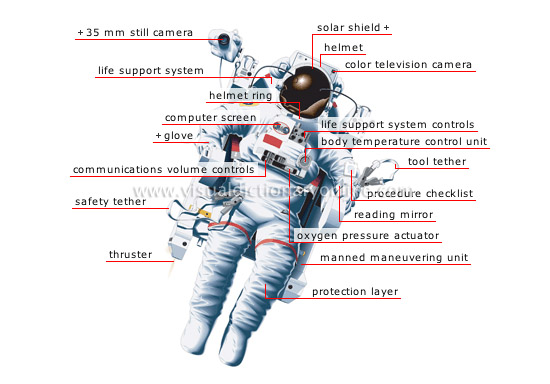
For those of you who don't have iPhones (yet), I also came across a great visual dictionary that I imagine will be great for teaching visual literacy. Think online-multi-themed-picture-dictionary-with-cutaway-images. The Merriam-Webster Visual Dictionary Online covers a number of themes from 'astronomy' to 'sports and games' and images can be embedded in blogs/websites. It also posts a weekly game for students which involves putting the labels in the right places. Thanks to Dominic P. Tremblay from Resources for Teachers for the tip about this resource. NSW teachers who are focusing on transport this term should definitely check out this resource for the relevant pages in the 'transport and machinery' pages. Here's a sample of the types of images available. I've chosen a spacesuit because my class will be investigating space exploration later in the year.
This week has been a bit of a crazy week as we wind down toward Christmas, take down work, and finish things off. We've still managed to do some learning and have a bit of fun while we're at it.
Fun this week: Sheep Shearing - The characters in "Are We There Yet?" learnt how to shear sheep, so we joined them with this learning. We watched a video of a sheep being shorn and then students wrote about how they would feel if they were the shearer. We then watched the video a second time and students thought and wrote about the perspective of the sheep.
We watched the Pixar video "Boundin'" and talked about the reasons for shearing sheep, and considered who benefits from this. Students also discussed what they do to cheer themselves up when they are feeling down.
Theme Parks - The children in "Are We There Yet?" went on a ride at Surfers Paradise, so we included the Gold Coast theme parks as part of our journey. We watched a couple of YouTube videos of a rollercoaster ride at Movie World. One video was filmed from the ground and the other from on the ride.
Students compared the two videos and discussed the visual impact of each. We looked at online interactive maps of Movie World, Sea World, Dream World and Wet 'n' Wild. We discussed the features of the maps including the key and then students worked in small groups to design and decorate their own theme park maps. Students also wrote a journal entry about their imaginary day at Sea World.
Assembly - This week it was our turn to host the school assembly. We learnt the song "It's Raining on the Rock" and did some clapping sticks, swaying and coloured scarves with it. We only had time to learn the chorus, but it tied in so well with our unit of work "Are We There Yet?" that I couldn't let it slip by. We also shared our Daintree Rainforest posters. Some of the other Year 1 students showed their artwork of Uluru.
I am currently teaching gifted and talented students at a boys' school. I love what I do and the kids I teach. I am easily inspired and love to find ways to improve learning for my students using a variety of strategies and ideas. I am happiest in my life when I am actively learning and can connect with others to foster growth and understanding.



 Posts


