After years of using a rainbow path Goal Chart in my classroom, I decided to try something a bit different this year. I bought a Lego kit that can be assembled and reassembled in three different ways. When my students do something of note, they get a 'Lego build' which means they get to do a step in the book toward completing the Lego creation. Once the whole creation is complete the class gets a reward such as free time on the computers or extra play time outside.
It's simple enough, but also fun and my students put in the effort to get a Lego build. Lego builds are awarded for class achievements such as: walking quietly in line, working well on a task, keeping the bag area tidy etc
Showing posts with label fun. Show all posts
Showing posts with label fun. Show all posts
Saturday, June 7, 2014


Saturday, May 11, 2013
Comparing and Measuring Mass
In recent weeks we have been focusing on mass during class maths lessons. Given the success of our comparing and ordering capacity lessons, I decided to create a similar sequence of lessons for comparing and measuring mass using balance scales.
The first lesson was a cooperative task whereby students worked in groups of four to select items, compare them, measure their mass in a uniform unit and record their results in both written and video form. Students enjoyed this hands on approach and worked effectively in their teams. We then had a sharing time for students to select a video to show the class.
The second lesson was a rich task for assessment purposes. Students were required to select items for Little Red Riding Hood to take in her basket to her grandmother's house. They needed to choose five or more items weighing a total of less than one kilogram. While the task went well, it got pretty hectic when I tried to have everyone doing the assessment task at the same time and recording their measurements as well. I got students to finish off one at a time at stations and that was much more sane, so that's what I would recommend for anyone trying to do this. I would also recommend students only video recording an explanation of their results when they have completed the measurement rather than the whole process.

I have uploaded the lessons to my Teachers Pay Teachers store.
The packet includes:
Instructions and recommendations for use
Cooperative task and worksheets (including version without video cameras)
Rich task for assessment with worksheets and rubric
I'm really enjoying creating these measurement tasks with rich tasks relating to fairy tales. I wonder what I'll do when I get to length and area!
The first lesson was a cooperative task whereby students worked in groups of four to select items, compare them, measure their mass in a uniform unit and record their results in both written and video form. Students enjoyed this hands on approach and worked effectively in their teams. We then had a sharing time for students to select a video to show the class.
The second lesson was a rich task for assessment purposes. Students were required to select items for Little Red Riding Hood to take in her basket to her grandmother's house. They needed to choose five or more items weighing a total of less than one kilogram. While the task went well, it got pretty hectic when I tried to have everyone doing the assessment task at the same time and recording their measurements as well. I got students to finish off one at a time at stations and that was much more sane, so that's what I would recommend for anyone trying to do this. I would also recommend students only video recording an explanation of their results when they have completed the measurement rather than the whole process.

I have uploaded the lessons to my Teachers Pay Teachers store.
The packet includes:
Instructions and recommendations for use
Cooperative task and worksheets (including version without video cameras)
Rich task for assessment with worksheets and rubric
I'm really enjoying creating these measurement tasks with rich tasks relating to fairy tales. I wonder what I'll do when I get to length and area!
Tuesday, April 16, 2013
Tech Tips Tuesday
Integrating ICT with Maths

Last week I had a great lesson planned for Maths. I was going to get the laptop trolleys and have my students use a Microsoft Word template to insert 2D shapes into a table. It was fairly straightforward and I had my template ready to go.
Unfortunately, on arrival at school, I found a big red sign on one of the trolleys stating "DANGER. DO NOT USE". I wasted no time tracking down someone who could give me more information. As it turned out, the trolley had been sparking, and was thus deemed unsafe until it could be looked at further by someone in the know. Needless to say, that didn't help me with only 20 minutes until my class walked through the door!
As is often the case when you plan to use technology, I had to rethink what I would do. There were still four laptops and I have a student computer in my room, so I grabbed them. As I went to leave the storeroom, I noticed the iPads, which I hadn't yet utilised. I had no idea what apps were on them, but a plan started forming in my mind - and all it required was the camera and a drawing application.
So what I ended up with was four Maths centres:
1. Using the laptops with the Microsoft Word template to draw and describe common 2D shapes: triangle, square, rectangle, pentagon, hexagon, rhombus, trapezium and octagon. The second page involves students creating their own design with polygons of their choice - but students did not get to this in the time allotted, and finished during our lab session.
2. Using iPads to photograph five shapes in the classroom environment and then using Draw Free to trace the polygons in the photos and label them.
3. Using rubber bands and geoboards to explore quadrilaterals and then draw them in their maths books.
4. Using plastic sticks of various sizes and pins to create polygons with a variety of sides and explore how these shapes change when tilted and manipulated in other ways.
What resulted was a really enjoyable set of Maths centres focused on exploring polygons. I should also mention that I used the Mathletics dictionary and concept search to support my definition of polygons and quadrilaterals prior to the activity centres.
It's great when things work out, even when they don't initially go to plan!
Tuesday, March 12, 2013
Tech Tips Tuesday
Just Dance Kids
Pinterest is the place of interest for many of the teachers I know at the moment. It seems to be the 'go to' place for great ideas. I'm just dipping my toes in that water at the moment, but have been more than happy to go along with the ideas that others have found. This week we tried an idea for a brain break.
While students were quietly working on a task we surprised them with a YouTube video from Just Dance Kids on the interactive whiteboard. When they hear the music students move to our open space and join in the dance. As soon as the music stops they return to their seats and continue with their work. It's fun, refreshing and I'm sure has brain benefits too!
It's a simple idea, but adds a bit of spark to an otherwise uneventful session.
Wednesday, February 6, 2013
Lost and Found
When we returned from our overseas trip in the USA, we were disappointed to discover that somewhere we had misplaced our old camera, which we had given to our son as a learning camera. While disappointed, we shrugged it off as just one of those losses. The little guy, on the other hand, was not so willing to let it go and often talked of how he missed his camera. So, I decided to put in a little more effort toward finding it. And, alas, we found out that we had left it at The Donatello Hotel in San Francisco. Our stay there had been fantastic and the staff were very helpful with tracking down the camera and sending it back to us. It arrived this week and we were very excited to see the camera again and to get a glimpse of the trip through the eyes of my little guy.
There were many photos like this:

And this funny one, which says to me: "What is that two-year-old doing with a camera?" (We don't know who this lady is, but she was one of the many photographing Lombard Street!)

And this one, my favourite, which we have unofficially named Reflections of Lombard Street

Now the little guy has got his camera back, he has moved on to learning about the zoom function and use of the flash. Yesterday he also took it further and learned about how the camera connects to the laptop to put the photos on our server! As one who loves to take photos, it's nice to know that he can get back to his experimenting without impinging on my own camera time!
It's fun to see what he captures, often by chance, in that moment when the shutter opens. One might wonder whether more guidance will help or hinder his ability to capture creative images. What do you think?
Tuesday, June 29, 2010
Tech Tips Tuesday
This guest post was written by education writer Karen Schweitzer. Karen is the About.com Guide to Business School. She also writes for PharmacyTechnicianCertification.com.
20 Free Summer School Resources for Students
Studies have shown that kids experience learning loss from grade to grade if they do not participate in educational activities on their summer break. Of course, convincing kids to study during the summer is no easy feat. Turning to the Internet may be one of the best ways to keep them engaged and interested in academic activities. When kids are online, they don't usually feel like they're studying--especially if they're having fun. Here are 20 sites your student can try throughout the summer.
Book Adventure - Designed for K-8 students, this free reading motivation program allows children to create their own book list, get reading recommendations, take quizzes about books they have read, and earn points and prizes for their efforts.
Big Universe - Big Universe is an award-winning site for both reluctant readers and creative kids. Registered members can read hundreds of books and take quizzes to test their comprehension. Big Universe also offers a unique tool that allows users to create, print, and publish animated e-books.
MeeGenius - MeeGenius is an online picture book library for kids. Library patrons can read books, personalize books with their own name, and share the books they read and personalize with other people.
Read Print - This online library provides more than 8,000 classic books, poems, and plays that can be read for free online. Children's favorites include Alice's Adventures in Wonderland, Peter Pan, and Little Women.
Librivox - Librivox is a good source for free audio books. The site's volunteers have recorded thousands of books that are in the public domain. MP3 and ogg files are available for many of the best-loved classes.
365 Pictures - 365 Pictures offers writing prompts to inspire creativity. A new photo prompt is published each day. Old prompts are also available in the site's archive.
Whyville - Whyville is a social learning community for kids. After becoming Whyville citizens, children can chat, play games, and learn about science, math, art, and more.
Seussville - Seussville provides a wide range of games based on Dr. Seuss' books. Site visitors can also listen to music and sign up to win free books.
Tutpup - This free, award-winning site provides a safe place for children to play educational games and challenge other students around the world. Game categories include spelling, times tables, basic math, and algebra.
Math Playground - Designed for elementary and middle school students, Math Playground offers math games, logic puzzles, word problems, math videos, and other resources to keep kids up-to-date on their math skills throughout the summer.
Arcademic Skill Builders - This site offers free single-player and multi-player arcade games that can be played online. All of the games are educational and designed to maintain and approve academic skills.
Canvastic.net - Canvastic.net if a web-based graphics tool for K-8 students. The free version has many useful features, but does include advertisements. An upgraded version without ads is available for a small fee.
Tux Paint - Tux Paint is an open source drawing program for children age 3 and up. The program provides easy-to-use drawing tools, sound effects, and a helpful cartoon mascot.
Crayola.com - Students can express their creativity and work on their art skills in Crayola's Creativity Center. The site offers a card maker, certificate maker, games, and more.
Stellarium - Stellarium is like a planetarium for your computer. The software is free to download and displays a realistic night sky on your desktop.
International Space Station - NASA offers a wide range of information about the International Space Station on their website. Students can view videos, photos, and details of current missions.
National Zoo Web Cams - Children can tour the Smithsonian Nation Zoological Park over the summer by tuning into the zoo's live web cams. Some of the animals that can be viewed include fish, otters, ferrets, cheetah, leopards, fishing cats, lions, tigers, pandas, gorillas, and flamingos.
FreeRice - This UN World Food Program site is good for older students who like trivia and community service. Every time a trivia question is answered correctly, rice is donated to the hungry. Trivia categories include art, chemistry, English, math, foreign languages, and geography.
Yugma - Yugma is a free web-based conferencing tool that would work well for students who need off-site tutoring over the summer. The tool allows users to share desktops and meet with up to 20 people at once.
BJ Pinchbeck's Homework Helper - BJ Pinchbeck's Homework Helper is an excellent place to find additional summer school resources. The site links to resources all over the web. Resource categories include art, music, computer science, English, math, science, health, foreign languages, and social studies.
Tuesday, December 8, 2009
Tech Tips Tuesday

This Week's Tip: Photo Fun
For some quick fun with photo effects, Photo Funia is the place to be. It's very easy to use and the kids LOVE it! Why not create a moon scene display board and get your students to put themselves in a spacesuit? Students can put their face on money, or wanted posters and see themselves as Jedi masters. I got a bit carried away with this, making myself a cupid, Mona Lisa, Marilyn Monroe and body builder. My students said: "Mrs Ryder, you seem to be having too much fun with this!"
Preparation:
Take a photo of all of your students in good light and save these to a location that is easy for students to access. (Files need to be less than 8MB). Ensure that the website is not blocked in your school.
Lesson:
- Students go to the website: http://photofunia.com/effects/
- They select the desired effect.
- THEY SELECT NOT TO HAVE THEIR PHOTO ADDED TO THE FACES SECTION OF THE WEBSITE (Some effects say this will not happen, others require students to tick the box).
- They choose the image they would like to upload and wait for their picture to be created.
- They then choose to save the image to an appropriate location (their folder).
- Students can then print the image from this folder or use the file in other multimedia products
Update: Please be warned that from time to time, inappropriate scenes may be included in the effects. Use at your own discretion.
Sunday, September 20, 2009
Friday Fun - 18/9/09
We've almost made it to the end of the term and with holidays just around the corner, we've been madly trying to finish all the things we've started. As a result, there wasn't a lot of new learning taking place, but rather refining and completing. We did, however, have an exciting excursion to the CSIRO Green Machine...
Fun This Week
We joined in one of the great programs offered at the CSIRO. Students learnt some background information about colour and then explored the colours that are used to make a black marker:


 They then created T-shirts using permanent markers and ethanol to spread the colours:


 The kids had a lot of fun and proudly wore their new creations. Some thought they should be adopted as part of school uniform!
Before we left the CSIRO, our teacher showed us this awesome experiment using ethanol:
We then walked to the Botanic Gardens for lunch on nice green lawn in the shade of big trees. We took a walk through the 'rainforest' and saw some lizards down by the loos, before hopping back on the bus and returning to school.
Fun This Week
We joined in one of the great programs offered at the CSIRO. Students learnt some background information about colour and then explored the colours that are used to make a black marker:


 They then created T-shirts using permanent markers and ethanol to spread the colours:

 The kids had a lot of fun and proudly wore their new creations. Some thought they should be adopted as part of school uniform!
Before we left the CSIRO, our teacher showed us this awesome experiment using ethanol:
We then walked to the Botanic Gardens for lunch on nice green lawn in the shade of big trees. We took a walk through the 'rainforest' and saw some lizards down by the loos, before hopping back on the bus and returning to school.
Sunday, August 30, 2009
Hunting for Treasure
Today I finally got around to trying geocaching. I've been hearing about other people in my PLN who have tried this out, and I thought it sounded like a bit of fun.
So what is geocaching? Geocaching is a treasure hunt with a GPS. You are given the location for a hidden cache and some clues to get you started. You head off with your GPS (or in my case, my iPhone) and start searching. The cache may vary, but generally consists of some form of logbook and may have small items you can trade.
To get started, you sign up for an account at www.geocaching.com. I also bought the Groundspeak Geocaching App for my iPhone ($12.99 but very helpful on my hunt). Groundspeak took my location and found some hidden geocache points close by. I followed the arrows, and then as I got closer, had to rely on my eyes and brain a lot more.
I took along my hubby, his mother and our dog. It was an adventure for all of us, and we were very glad to have found the two caches we set out to find.
If you haven't tried it out already, I recommend it as a fun way to spend some time.

So what is geocaching? Geocaching is a treasure hunt with a GPS. You are given the location for a hidden cache and some clues to get you started. You head off with your GPS (or in my case, my iPhone) and start searching. The cache may vary, but generally consists of some form of logbook and may have small items you can trade.
To get started, you sign up for an account at www.geocaching.com. I also bought the Groundspeak Geocaching App for my iPhone ($12.99 but very helpful on my hunt). Groundspeak took my location and found some hidden geocache points close by. I followed the arrows, and then as I got closer, had to rely on my eyes and brain a lot more.

I took along my hubby, his mother and our dog. It was an adventure for all of us, and we were very glad to have found the two caches we set out to find.
If you haven't tried it out already, I recommend it as a fun way to spend some time.
Blogger Behind This Blog #7
A few weeks back we travelled up to Sydney for the City to Surf. For many years I've been meaning to get around to running this race, but for whatever reason, haven't pulled it off. This is a fourteen kilometre road race, beginning in Sydney City and ending at Bondi Beach.
This year I had a training program that I found online and I stuck pretty closely to it. It was a fairly hard training program - with a long run on Sunday, 30 minute run on Monday, intervals on Tuesday and medium run on Wednesday before I finally got to a rest day on Thursday. I found it tough, but always seemed to find the energy when I needed it, and didn't get sick at all, even when running about 50km in a week. (I used to get tired, sick, or sore when I went over 30km in a week). I tried to include some hills or mountain running in the program in preparation for the dreaded "heartbreak hill".
We stayed at a hotel in Sydney and hooked up with some friends who were also running the race. We went out for dinner together to load up on carbs and then hung out for a while at the hotel before crashing for the night.
On race day we met up for a hotel breakfast - something to sustain us but not overfill us - and headed down to the starting line at Hyde Park. There were people EVERYWHERE! With a record 75,000 competitors it was the world's biggest running event. Once in position we did a lot of waiting before we actually got to move anywhere, and even once we started to move, it was quite slow. As it was my first year running, I was in the 'blue' group which is made up of the masses - the slow people and the first timers.
For the first five kilometres I focused on running and weaving. I found that I couldn't go more than about ten strides before having to weave around walkers. I tried to use the footpaths as much as possible, but didn't want to be seen to be cheating either! Please understand - I'm not blaming the walkers, just expressing my frustration as a runner.

The weaving continued for most of the race and I don't feel I ever actually found my pace group. Usually in a race I find a point in time when I'm not overtaking people any more - when I'm with people of a like pace. I was feeling unusually strong throughout the race and was running well. I didn't stop for hydration as it was an opportunity to make greater headway through the crowds. I was listening to my run playlist on my iPod, which always helps to put more speed and power in my pace.
Heartbreak Hill didn't end up being so heartbreaking after all. I ran the whole thing and found it quite a non-event given my prior preparation. There was a great atmosphere with people along the sidelines cheering and runners in crazy costumes. The weather was perfect for running and I found the kilometres were flying by.
As I came to the last stretch along Bondi Beach I felt a tingle go through my body. I was almost there, and all these people were cheering us along. Crossing the finish line was a real let down. I felt almost disappointed. One moment I was running this race, enjoying the music and mood, and caught up in the weaving. The next moment it was all over. We walked through a couple of gates, picked up our medallions and then the weaving through crowds continued as we tried to get to the water stands to rehydrate.
 I met up with the others from my group at our meeting point. It took awhile for everyone to find it and none of us were really sure what time we had run due to differences between race start time and our actual time. I had started my stopwatch at the beginning of the race, but was slow to press it at the finish line. I had run it in a good time - good enough to get me into a better starting position for next year. You can see photos of me running and a video of me finishing here.
We decided to cab it back to the hotel as the lines for the free buses were ridiculously long. We showered and ended the experience with a great steak lunch down at Darling Harbour.
Can't wait to do it all again next year, but training for the Canberra Times Fun Run in the meantime.
This year I had a training program that I found online and I stuck pretty closely to it. It was a fairly hard training program - with a long run on Sunday, 30 minute run on Monday, intervals on Tuesday and medium run on Wednesday before I finally got to a rest day on Thursday. I found it tough, but always seemed to find the energy when I needed it, and didn't get sick at all, even when running about 50km in a week. (I used to get tired, sick, or sore when I went over 30km in a week). I tried to include some hills or mountain running in the program in preparation for the dreaded "heartbreak hill".
We stayed at a hotel in Sydney and hooked up with some friends who were also running the race. We went out for dinner together to load up on carbs and then hung out for a while at the hotel before crashing for the night.
On race day we met up for a hotel breakfast - something to sustain us but not overfill us - and headed down to the starting line at Hyde Park. There were people EVERYWHERE! With a record 75,000 competitors it was the world's biggest running event. Once in position we did a lot of waiting before we actually got to move anywhere, and even once we started to move, it was quite slow. As it was my first year running, I was in the 'blue' group which is made up of the masses - the slow people and the first timers.
For the first five kilometres I focused on running and weaving. I found that I couldn't go more than about ten strides before having to weave around walkers. I tried to use the footpaths as much as possible, but didn't want to be seen to be cheating either! Please understand - I'm not blaming the walkers, just expressing my frustration as a runner.

The weaving continued for most of the race and I don't feel I ever actually found my pace group. Usually in a race I find a point in time when I'm not overtaking people any more - when I'm with people of a like pace. I was feeling unusually strong throughout the race and was running well. I didn't stop for hydration as it was an opportunity to make greater headway through the crowds. I was listening to my run playlist on my iPod, which always helps to put more speed and power in my pace.
Heartbreak Hill didn't end up being so heartbreaking after all. I ran the whole thing and found it quite a non-event given my prior preparation. There was a great atmosphere with people along the sidelines cheering and runners in crazy costumes. The weather was perfect for running and I found the kilometres were flying by.
As I came to the last stretch along Bondi Beach I felt a tingle go through my body. I was almost there, and all these people were cheering us along. Crossing the finish line was a real let down. I felt almost disappointed. One moment I was running this race, enjoying the music and mood, and caught up in the weaving. The next moment it was all over. We walked through a couple of gates, picked up our medallions and then the weaving through crowds continued as we tried to get to the water stands to rehydrate.
 I met up with the others from my group at our meeting point. It took awhile for everyone to find it and none of us were really sure what time we had run due to differences between race start time and our actual time. I had started my stopwatch at the beginning of the race, but was slow to press it at the finish line. I had run it in a good time - good enough to get me into a better starting position for next year. You can see photos of me running and a video of me finishing here.
We decided to cab it back to the hotel as the lines for the free buses were ridiculously long. We showered and ended the experience with a great steak lunch down at Darling Harbour.
Can't wait to do it all again next year, but training for the Canberra Times Fun Run in the meantime.
Tuesday, August 25, 2009
Tech Tips Tuesday
This Week's Tip - IWB Pages
I've been playing with my Interactive Whiteboard more than usual this week. I designed some pages to give other teachers ideas for how they can use their boards. I'm trying to get teachers to turn their boards on at the start of the day so that they are more likely to continue to use them throughout the day. If you have a Smart Board, you can create similar pages of your own.
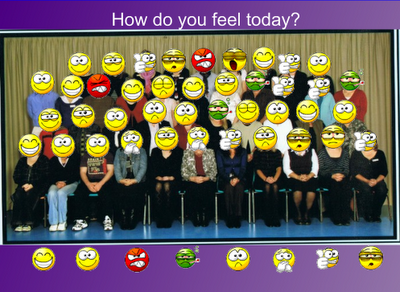
This first page is a fun way of marking the roll. I used this one for the teachers' staff meeting, but I use the same idea with my class photo. It is simple to make and the kids love it. When they arrive each day, they choose the face that best fits how they feel, and drag it over their face. I can see at a glance how students are feeling and who is yet to arrive. This is great for creating a class community and learning environment. To start fresh the next day, select the faces with a click and sweep action and delete.
To Make This Page:
Step 1: Scan or upload a class photo
Step 2: Insert photo
Step 3: Use text to add a heading
Step 4: Save emoticons from My Emoticons
Step 5: Insert emoticons and place beneath photo. Right-click on them and choose the "Infinite Clone" option.
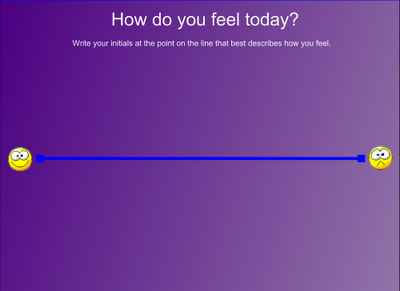
For another option, you could make a simple line and students determine their mood on a scale between happy and sad. They write their initials to place themselves.
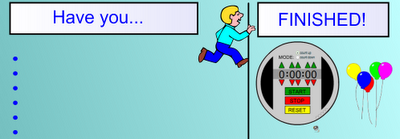
This page is for students to self-regulate as they are finishing their work. You write in the explicit quality criteria for the dot points and set the timer for the desired time. When students have finished the work they move their photo (not shown) or name across the line and hit the little sound icon (near the balloons) to hear a cheer.
 To make this page:
Step 1: Make headings (I used a rectangle shape and then a text box)
Step 2: Divide page with a line
Step 3: Add bullet points (you need to put a space before pressing return/enter in order to keep the dot point)
Step 4: Insert timer and balloons and runner from the gallery (search for 'timer' and 'cheer' and 'race')
Step 5: Insert small photographs of students (100 x 75 pixels) or write/type names in individual text boxes.
I've been playing with my Interactive Whiteboard more than usual this week. I designed some pages to give other teachers ideas for how they can use their boards. I'm trying to get teachers to turn their boards on at the start of the day so that they are more likely to continue to use them throughout the day. If you have a Smart Board, you can create similar pages of your own.
This first page is a fun way of marking the roll. I used this one for the teachers' staff meeting, but I use the same idea with my class photo. It is simple to make and the kids love it. When they arrive each day, they choose the face that best fits how they feel, and drag it over their face. I can see at a glance how students are feeling and who is yet to arrive. This is great for creating a class community and learning environment. To start fresh the next day, select the faces with a click and sweep action and delete.

To Make This Page:
Step 1: Scan or upload a class photo
Step 2: Insert photo
Step 3: Use text to add a heading
Step 4: Save emoticons from My Emoticons
Step 5: Insert emoticons and place beneath photo. Right-click on them and choose the "Infinite Clone" option.
For another option, you could make a simple line and students determine their mood on a scale between happy and sad. They write their initials to place themselves.

This page is for students to self-regulate as they are finishing their work. You write in the explicit quality criteria for the dot points and set the timer for the desired time. When students have finished the work they move their photo (not shown) or name across the line and hit the little sound icon (near the balloons) to hear a cheer.
 To make this page:
Step 1: Make headings (I used a rectangle shape and then a text box)
Step 2: Divide page with a line
Step 3: Add bullet points (you need to put a space before pressing return/enter in order to keep the dot point)
Step 4: Insert timer and balloons and runner from the gallery (search for 'timer' and 'cheer' and 'race')
Step 5: Insert small photographs of students (100 x 75 pixels) or write/type names in individual text boxes.
Sunday, July 5, 2009
New Gold Mountain #3
Unfortunately, I found it too difficult to keep up with regular posts about our unit on the book "New Gold Mountain" by Christopher W. Cheng. Instead, I am offering some suggestions for the activities that I found useful. Please also check New Gold Mountain #1 and New Gold Mountain #2 for earlier posts.

Learn to play Fan Tan - The Chinese miners regularly played Fan Tan, a card game, and often gambled away their new-found wealth. We had a few games and came to realise how noisy the game could be and how easily it could lead to frustration and arguments - especially if money was involved!
Letters back to China - In the book one of the characters writes a letter back to his village in China. He doesn't tell the truth about his situation given that he has gambled away all his gold playing Fan Tan! Students wrote two letters back to China: one painting a rosy picture of the situation, and one giving a more honest account.
Character Comparison - As a class we made a Venn Diagram to illustrate the similarities and differences between Rowan (of Rin) and Shu Cheong. Students became really engaged in this activity and sought out lots of great examples of similarities. When we had finished brainstorming, students wrote the comparison in essay form. I gave them an introductory paragraph and then helped them to work through a structure for following paragraphs. We thought of some useful phrases for beginning paragraphs: 'An important similarity is...' 'Yet another similarity is...' 'Both Rowan and Shu Cheong...' We also thought of some comparison connectives (I'm sure they have a proper name) like 'whereas', 'while', 'however', 'although', 'but', 'and', 'whilst'.
Historical Diary - I already mentioned that students created a diary entry from the perspective of a convict. Later in the unit we repeated this activity with students writing from the perspective of an explorer of their choice. I borrowed a huge pile of non-fiction texts about explorers from the library. Students were given about 30 minutes to research their explorer and take some notes. They then moved into small groups focused on the same explorer to share the knowledge they had uncovered. After this sharing time students went back to working independently and created their diary entries. They were given more time to work on this in future lessons.
Final Weeks - In the final weeks I wanted to give students a chance to take charge of their learning and self-manage their tasks. Students needed to complete the reading of the text and review, edit and publish one of their written pieces from the term so that we could compile them into a class book. Students responded well to this and most completed both tasks by the due date.
Thoughts on the unit...
This was a great book to use as part of our study of Australian History as it helped students to consider the non-European perspective. It provided us with an opportunity to discuss racism and to form arguments against racism.
I enjoyed introducing students to historical fiction and found the diary format an easy way for students to dabble with writing historical fiction for themselves.

Learn to play Fan Tan - The Chinese miners regularly played Fan Tan, a card game, and often gambled away their new-found wealth. We had a few games and came to realise how noisy the game could be and how easily it could lead to frustration and arguments - especially if money was involved!
Letters back to China - In the book one of the characters writes a letter back to his village in China. He doesn't tell the truth about his situation given that he has gambled away all his gold playing Fan Tan! Students wrote two letters back to China: one painting a rosy picture of the situation, and one giving a more honest account.
Character Comparison - As a class we made a Venn Diagram to illustrate the similarities and differences between Rowan (of Rin) and Shu Cheong. Students became really engaged in this activity and sought out lots of great examples of similarities. When we had finished brainstorming, students wrote the comparison in essay form. I gave them an introductory paragraph and then helped them to work through a structure for following paragraphs. We thought of some useful phrases for beginning paragraphs: 'An important similarity is...' 'Yet another similarity is...' 'Both Rowan and Shu Cheong...' We also thought of some comparison connectives (I'm sure they have a proper name) like 'whereas', 'while', 'however', 'although', 'but', 'and', 'whilst'.
Historical Diary - I already mentioned that students created a diary entry from the perspective of a convict. Later in the unit we repeated this activity with students writing from the perspective of an explorer of their choice. I borrowed a huge pile of non-fiction texts about explorers from the library. Students were given about 30 minutes to research their explorer and take some notes. They then moved into small groups focused on the same explorer to share the knowledge they had uncovered. After this sharing time students went back to working independently and created their diary entries. They were given more time to work on this in future lessons.
Final Weeks - In the final weeks I wanted to give students a chance to take charge of their learning and self-manage their tasks. Students needed to complete the reading of the text and review, edit and publish one of their written pieces from the term so that we could compile them into a class book. Students responded well to this and most completed both tasks by the due date.
Thoughts on the unit...
This was a great book to use as part of our study of Australian History as it helped students to consider the non-European perspective. It provided us with an opportunity to discuss racism and to form arguments against racism.
I enjoyed introducing students to historical fiction and found the diary format an easy way for students to dabble with writing historical fiction for themselves.
Friday Fun 3/7/09 (a little late!)

It's not hard to have fun in the last week of term. There's fun stuff to finish off, and it's not really worth starting anything new, so the spare moments are fun too. On top of that, fun stuff is usually programmed into the week.
Fun this week
Another visit to the Ridge
On Monday afternoon we took another trip up the Ridge to do some weeding. We pulled up lots of verbascum and our area is now
 looking really great. We also took up some new brochures for the trail our school has been involved with and saw the sign that was recently installed. A journalist and photographer for the local community newspaper joined us and added our story (with front page picture) to this week's newspaper.
Green Up, Clean Up Day
The SRC held a fundraiser to purchase paint for playground markings to be sprayed under our new shade structure. Students dressed up in green and brought a gold coin donation. In order to 'clean up' and cut back on waste, our students were asked not to bring lunch items with extra packaging.
Jump Rope for Heart - Jump Off
On Thursday, we had a special assembly with Happy Heart of the Heart Foundation. The Skippy Chicks (our school's skipping team) demonstrated different skipping steps that students might like to try out individually, in pairs and with a long rope. Throughout the day classes took turns to rotate through skipping activities in the school hall. Students had fun, got fit and raised funds for research into heart disease, education and health promotion.
Mr Tucker's Balderdash Challenge
Mr Tucker was feeling more motivated than me as the week drew to a close. He set up a Balderdash Challenge with students competing for points in teams. He selected a number of Aussie slang phrases, and groups made up possible meanings for these. They then voted, with the most convincing definitions scoring the most votes.
Ned Kelly Paintings
Having learnt about Ned Kelly last week, we took a closer look at the paintings of Sidney Nolan and then students made their own Ned Kelly paintings using watercolours and ink or oil pastels. It was fun to see the unique perspectives students brought to the task. We really should do more painting!
Matilda
Mr Tucker's literacy class has been reading the book "Matilda" by Roald Dahl, so on Friday afternoon we watched the movie as a celebration and to compare the two. It's a great movie that shows how we can triumph despite adversity. The kids loved it.
Field Events
We've split our athletics carnival into two sessions this year. An afternoon for the field events and a day for the whole school to compete in the track events. Friday afternoon was the field event session and many of our students competed in shot put and long jump events.
Friday, May 22, 2009
Friday Fun - 22/5/09
Wow! What a whirlwind week! This week was jam packed with all sorts of fun learning and not much in the way of sitting in the classroom.
Camp
On Tuesday and Wednesday we had our Year 4 camp which was a lot of fun. I even had a go at the archery and took on the instructor. Students picked who they wanted to back. (I won!) You can watch the video below. On their return to school, students used Debono's Six Thinking Hats to reflect on their experiences.
Time Travel in Australia's History
On Monday we had the first in a series of visits from "Captain Lister" who is taking us back in time to learn about Australia's history from colonisation through to 1900. Students powered the time machine, with static electricity, by rubbing their heads. The multimedia presentation showed us going back in time... before High School Musical...before iPods...before computers...before telephones...etc This week Captain Lister took us back to 1770, when Captain James Cook explored and mapped much of the eastern coast of Australia. Students got dressed up in costumes as Captain Cook, botanist Joseph Banks and William Hicks. They learnt about this journey and life aboard a ship.
Joseph Banks had a go at drawing a kangaroo and we saw a copy of the original picture he drew. We then hopped back into the time machine and returned to the current day.
Lucky Phewa - Zulu Celebration
Lucky Phewa, a performer from Durban in South Africa engaged students with his "Zulu Celebration". Students really enjoyed the music he shared with them and had the music bug for the rest of the day. They really got a great feel for the rhythm.
A New Song
Mr Tucker taught us all a new song called Down River by the Wilcannia Mob. This Australian hip hop song was created and recorded by five boys aged 8-12 in 2002. The boys share their own story through rap and the backing sounds of the digeridoo. You can find out more about their project at Down River.
Australian History Projects
Students have been continuing with their work on the culture and lifestyle of different Aboriginal clans prior to colonisation. We had some more time to work on the computers for research and publication. Many students are creating PowerPoint presentations...
 Some are creating Museum Boxes...
 And others are recording audio files with the Snowball...
 We are trying to get as many opportunities to use the computers as possible in order to complete these projects. Students are learning a lot about ICT as they use it for real purposes in connection with their classroom learning.
Camp
On Tuesday and Wednesday we had our Year 4 camp which was a lot of fun. I even had a go at the archery and took on the instructor. Students picked who they wanted to back. (I won!) You can watch the video below. On their return to school, students used Debono's Six Thinking Hats to reflect on their experiences.
Time Travel in Australia's History
On Monday we had the first in a series of visits from "Captain Lister" who is taking us back in time to learn about Australia's history from colonisation through to 1900. Students powered the time machine, with static electricity, by rubbing their heads. The multimedia presentation showed us going back in time... before High School Musical...before iPods...before computers...before telephones...etc
 This week Captain Lister took us back to 1770, when Captain James Cook explored and mapped much of the eastern coast of Australia. Students got dressed up in costumes as Captain Cook, botanist Joseph Banks and William Hicks. They learnt about this journey and life aboard a ship.
Joseph Banks had a go at drawing a kangaroo and we saw a copy of the original picture he drew. We then hopped back into the time machine and returned to the current day.
Lucky Phewa - Zulu Celebration
Lucky Phewa, a performer from Durban in South Africa engaged students with his "Zulu Celebration". Students really enjoyed the music he shared with them and had the music bug for the rest of the day. They really got a great feel for the rhythm.
A New Song
Mr Tucker taught us all a new song called Down River by the Wilcannia Mob. This Australian hip hop song was created and recorded by five boys aged 8-12 in 2002. The boys share their own story through rap and the backing sounds of the digeridoo. You can find out more about their project at Down River.
Australian History Projects
Students have been continuing with their work on the culture and lifestyle of different Aboriginal clans prior to colonisation. We had some more time to work on the computers for research and publication. Many students are creating PowerPoint presentations...
 Some are creating Museum Boxes...
 And others are recording audio files with the Snowball...
 We are trying to get as many opportunities to use the computers as possible in order to complete these projects. Students are learning a lot about ICT as they use it for real purposes in connection with their classroom learning.
Year 4 Camp 2009
On Tuesday and Wednesday of this week, we took students on the Year 4 Camp. The camp was located about 30 minutes drive from the city, and it was nice to get out and explore nature. Students had the opportunity to explore a range of activities they don't usually get the opportunity to try including archery, orienteering, frisbee golf and initiatives (team problem solving challenges).

We went for a bushwalk on the first day, and after a steep climb, we enjoyed the view from the top (photo by RE). We had a short skit night, with students creating their own skits and performing in front of their peers. I was impressed by the courage students showed when performing their songs acapella. Later that night we had a campfire where we sang songs and toasted marshmallows.
On the second day we learnt about the wool industry and visited a wool shed to see a sheep being shorn. Students then got to pat a lamb that is about 6 - 8 months old. They got a sheep ear tag and some wool as souvenirs.

The kids had lots of free time in between meals and activities and as always, there were dramas of 'trashed rooms' and imaginative tales of murders that took place during the night! A couple of boys worked out how to create face paint with rocks and painted their faces on the last day. (Parents weren't so impressed!)
I took along the flipcam and a camera, and a couple of students brought along their digital cameras with video capacity as well. We passed the flipcam around for students to interview one another throughout the camp and on the trip back on the bus. The trip was well-recorded on film and now students can play around with the images to create photostories or movies with the recordings.
I experimented with updates to parents using our My Classes page, but I found the video files had to be quite small and they took a long time to upload. On the positive side, we set up a collaborative journal for parents to leave a message for their child, and when a new message came in, I showed it to the student on my iPhone and they could respond by adding a comment to the message.

We went for a bushwalk on the first day, and after a steep climb, we enjoyed the view from the top (photo by RE). We had a short skit night, with students creating their own skits and performing in front of their peers. I was impressed by the courage students showed when performing their songs acapella. Later that night we had a campfire where we sang songs and toasted marshmallows.
On the second day we learnt about the wool industry and visited a wool shed to see a sheep being shorn. Students then got to pat a lamb that is about 6 - 8 months old. They got a sheep ear tag and some wool as souvenirs.

The kids had lots of free time in between meals and activities and as always, there were dramas of 'trashed rooms' and imaginative tales of murders that took place during the night! A couple of boys worked out how to create face paint with rocks and painted their faces on the last day. (Parents weren't so impressed!)
I took along the flipcam and a camera, and a couple of students brought along their digital cameras with video capacity as well. We passed the flipcam around for students to interview one another throughout the camp and on the trip back on the bus. The trip was well-recorded on film and now students can play around with the images to create photostories or movies with the recordings.
I experimented with updates to parents using our My Classes page, but I found the video files had to be quite small and they took a long time to upload. On the positive side, we set up a collaborative journal for parents to leave a message for their child, and when a new message came in, I showed it to the student on my iPhone and they could respond by adding a comment to the message.
Tuesday, May 19, 2009
Tech Tips Tuesday
This Week's Tip: Explore the Galaxy
I am really excited about this week's tip and I'm hoping you won't have already heard about it, as it's been passed around in my Personal Learning Network (PLN) quite a bit this week. (From Silvia Tolisano on Twitter, to Paul Hamilton's Blog, to Teachers Love SMART Boards, to you! Will you pass it on as well?)
Tag Galaxy brings tagging to life and makes searching through Flickr photos fun. It's too hard to explain in written words so I made a little demo video for you. Please check it out and explore Tag Galaxy for yourself.
For more Tech Tips, click here.
I am really excited about this week's tip and I'm hoping you won't have already heard about it, as it's been passed around in my Personal Learning Network (PLN) quite a bit this week. (From Silvia Tolisano on Twitter, to Paul Hamilton's Blog, to Teachers Love SMART Boards, to you! Will you pass it on as well?)
Tag Galaxy brings tagging to life and makes searching through Flickr photos fun. It's too hard to explain in written words so I made a little demo video for you. Please check it out and explore Tag Galaxy for yourself.
For more Tech Tips, click here.
Tuesday, March 24, 2009
Tech Tips Tuesday

This week's tip: Tools for teaching Math(s)
This week I decided that you can never have too many tools for teaching maths. As I stood in front of my class explaining how to subtract a three digit number from 6000, I wished somehow that I could teleport somewhere far, far away and be replaced by the person who had all the right words at just the right time to make this tricky process perfectly clear.
These days, that perfect person is probably out there somewhere, and could quite possibly have made a video, flash activity or game to explain the process perfectly! And, these days, I have access to those materials and can display them on my interactive whiteboard for students to see and hear. And... if they don't get it the first time, we can replay those perfect words for another try. Then... I can help students as they work through some examples. I can use those perfect words to reinforce what students are doing.
So, today I'd like to share some of the wonderful resources that can be accessed as teaching tools and practice tools both in the classroom and at home. Some require registration (R), some require a paid subscription ($) and some are ready to go flash based activities.
Mathletics (R, $) is gaining momentum here in Australia. I worked with it at my previous school and we are in the process of registering at my new school. It is quite costly, but the school P&C paid for it in both locations. As far as I'm aware, Mathletics is the best at what it does. It is a brilliant system that continues to grow and improve while others try to keep up. They provide teacher training as schools get started.
When teachers make it a part of their teaching program it can have amazing results for students. Activities are relevant to classroom teaching and teachers have the option of setting activities as homework. There are opportunities to differentiate - selecting easier or harder programs for students to suit their abilities. Students design an avatar (character to represent themselves) and can win points and awards by working on Maths activities. Teachers can monitor student progress and development. If a school has the money and the support of teachers, I couldn't recommend this more highly. This is an example of high quality online learning.
Smart Kiddies (R, $) is similar to Mathletics, but provides different resources. It was offering resources to teachers free during school hours, but at a cost to parents outside of school hours. According to a recent email I received, this may be changing to a free product at all hours for all users. This is a great option if your school has chosen not to go with Mathletics. I am currently using this as a teacher with my Maths class, but have not registered all my students and given passwords etc. Here you can find video explanations, interactive whiteboard activities, printable worksheets and an online dictionary of mathematical terms. It's a great tool to draw on during Maths lessons.
Crickweb is free and ready to use. It is not limited to Mathematics but also includes other subject areas in the UK curriculum. As it is a UK program, all money activities are in UK currency and some activities are more culturally attuned to UK students, however there are great activities here if you take the time to check them out in advance. These activities are designed to work with interactive white boards, or one-to-one computers if you're lucky enough to have them!
Let's Play Math! is a blog well worth subscribing to if you teach maths. This blog is about playing around with mathematical ideas. Blog posts are fun and help to illustrate maths in the real world.
Peep and the Big Wide World is a lot of fun for the littlies. It makes me wish I was back in Year 1, playing with these big, bright colourful creatures! I think that the kids would get very attached to this game and I can almost hear their cheers as their teacher announces the use of one of the activities for an introduction to a Maths lesson. If you want to engage your students from the get-go, this is the tool you're after.
I'm sure there are plenty of others, but they're the ones I've come across recently. What do you think? What else would YOU recommend?
Image: Teleport by alisarincrimson http://farm4.static.flickr.com/3092/2737752623_0f8c9f1c9e.jpg?v=0
Sunday, March 8, 2009
Sculpture Garden Sunday
Today I popped in at Sculpture Garden Sunday at the National Gallery of Australia. There were kids and families everywhere enjoying the music and getting creative. It got me more motivated for my first lesson on Tuesday. Our Readers' Theatre is going to be about a dinosaur sculptor, so I thought it might be a bit of fun to sculpt our own dinosaurs. After seeing the fun ideas today, I'm keen to see how my students explore their own creativity with the resources available.
Saturday, December 20, 2008
Friday Fun
This was the final week for school in my state. It was another busy week, but still fun.
Fun This Week:
Are We There Yet? YES! - This week we finished off our imaginary journey around Australia. The last few pages of "Are We There Yet?" by Alison Lester were a bit of a rush, but we made it! I created an online quiz using ProProf which we did as a class and then I was going to have students do it in the lab. Unfortunately, the videos didn't work at school due to system blocking of videos. But if you want to check it out, you can see it here:

So instead of doing the quiz in the lab, students explored the SmartBoard Notebook containing all the videos/photos etc for the term. It was a great way for students to review the material. We then went back to the classroom where they tried to label an Australian map with states and capital cities. I was REALLY impressed with how much they had learnt. The following day we actually read another story about a journey around Australia called "Santa's Aussie Holiday" by Maria Farrer and Anna Walker. It was interesting to hear the discussion as the kids compared the two journeys.
Gifts - Students made and wrapped gifts for their families. (I'm not going to spill the beans about those!)
Swimming Pool - On Thursday the junior school (K-2) went to the pool for the morning. The kids did a lot of swimming and splashing early on. Towards the end a couple of my boys set up their own little soccer field and started playing soccer. A couple of the girls joined in as cheer leaders. I was most impressed as they did it all on their own initiative without any encouragement whatsoever from me! 

Class Party - On Friday afternoon some of the parents organised a class party for the kids. It was a pretty wild half-hour so I think we were all quite glad it was at the end of the day! Again, the kids showed initiative - climbing on chairs, stacks on, and running around the classroom!!! (It's much better when they use their powers for good!) The parents were really lovely with all their kind words and gifts. It was a pleasure working with them.
Tuesday, November 4, 2008
Alpha Show - Hercules
Yesterday we had a visiting theatre group at the school. Alpha Shows are becoming a tradition at my school - last year they brought "Cinderella" and this year we had "Hercules".
I wasn't sure what to expect as we headed up the corridor to the senior hall. When we got there we were met by a darkened hall with modern music, a smoke machine, and fancy light show. It raised my expectations immediately, and they were not disappointed once I got my class seated and settled.
The set was well designed and the costumes effective. I was particularly impressed with how well the show connected with students emotionally. That is the beauty of theatre - it's not like watching television - it connects with you on a much deeper level. I kept an eye on my students while the show progressed. One of my girls was brought to tears by the scene where Hercules was stolen from his home by the evil Hades. She quickly wiped them away and continued to watch the show. One of my boys had a twinkle in his eyes as Hades fought Hercules. He was swinging punches in his spot trying to help out Hercules as he fought!
One thing I really loved about the show was that it not only told the story of Hercules, but also presented the message that a true hero is not about outer strength, but comes from the inside.
What a great start to the new week!
Here is the promo for Alpha Shows. Other videos are available at YouTube or at the Alpha Shows Website.
I wasn't sure what to expect as we headed up the corridor to the senior hall. When we got there we were met by a darkened hall with modern music, a smoke machine, and fancy light show. It raised my expectations immediately, and they were not disappointed once I got my class seated and settled.
The set was well designed and the costumes effective. I was particularly impressed with how well the show connected with students emotionally. That is the beauty of theatre - it's not like watching television - it connects with you on a much deeper level. I kept an eye on my students while the show progressed. One of my girls was brought to tears by the scene where Hercules was stolen from his home by the evil Hades. She quickly wiped them away and continued to watch the show. One of my boys had a twinkle in his eyes as Hades fought Hercules. He was swinging punches in his spot trying to help out Hercules as he fought!
One thing I really loved about the show was that it not only told the story of Hercules, but also presented the message that a true hero is not about outer strength, but comes from the inside.
What a great start to the new week!
Here is the promo for Alpha Shows. Other videos are available at YouTube or at the Alpha Shows Website.
Subscribe to:
Posts (Atom)


 Posts
Posts


